 capi.
Captcha catalog
What each supported captcha looks like and which service to call.
What you see — what to call
A captcha is named by what is in the picture and how you work with it, not by the site where you met it. Find your picture below and pick the type by it. The type and model go in the request: POST /v1/solve/{type}; for text and Hunt there is also the model or type field.
| Service | What to do | What you see | What to call |
|---|---|---|---|
| Hunt · happy_puzzle | Click on icons | The heading “Confirm you're not a robot”, a row of four icons joined by arrows, a picture with outlined shapes below it and a green SEND button. | POST /v1/solve/hunt · type=happy_puzzle |
| Hunt · swipe_goal | Slider | The caption “Drag the slider left or right to score a goal”: a goalkeeper at a goal, a ball at the side and a slider with arrows below. You drag the slider until the ball lands in the target. | POST /v1/solve/hunt · type=swipe_goal |
| GeeTest · Icon | Click on icons | The caption “Select in this order” and three black hint icons above a large picture full of objects. | POST /v1/solve/geetest_icon |
| GeeTest · Slide | Slider | The caption “Slide to complete the puzzle”, a picture with a gap and a puzzle piece, and a slider with an arrow under it. | POST /v1/solve/geetest_slide |
| GeeTest · Nine | Pick cells | A 3×3 grid of pictures and a separate hint picture: an object or an emotion (crying, angry, smiling face). You mark the matching cells. | POST /v1/solve/geetest_nine |
| Tencent · Icons | Click on icons | A “Verification” window with the caption “Click in this order”: coloured icons on the picture, three icons in the required order next to the caption and an OK button below. | POST /v1/solve/tencent_icons |
| Yandex · Icons | Click on icons | Yandex SmartCaptcha: icons on a busy background and a separate strip with the same icons in the required order. | POST /v1/solve/yandex_icons |
| Text · gaijin | Text in a picture | A picture of letters or digits and a field to type them into. Site: login.gaijin.net. | POST /v1/solve/text · model=gaijin |
| Text · mojeid | Text in a picture | A picture of letters or digits and a field to type them into. Site: MojeID. | POST /v1/solve/text · model=mojeid |
| Text · nova | Text in a picture | A picture of letters or digits and a field to type them into. Site: Nova88. | POST /v1/solve/text · model=nova |
Hunt · happy_puzzle
The heading “Confirm you're not a robot”, a row of four icons joined by arrows, a picture with outlined shapes below it and a green SEND button.
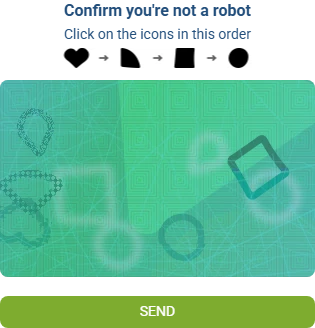
| Call | What to send | What you get |
|---|---|---|
| POST /v1/solve/hunt · type=happy_puzzle | The whole widget picture. | Click points in the order of the icons: extra.points. |
Hunt · swipe_goal
The caption “Drag the slider left or right to score a goal”: a goalkeeper at a goal, a ball at the side and a slider with arrows below. You drag the slider until the ball lands in the target.
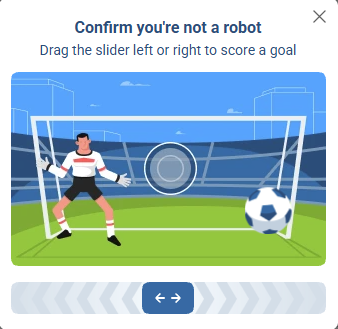
| Call | What to send | What you get |
|---|---|---|
| POST /v1/solve/hunt · type=swipe_goal | A snapshot of the widget. Send a new one after every step. | The position of the ball (ball) and the target (circle): detections. |
GeeTest · Icon
The caption “Select in this order” and three black hint icons above a large picture full of objects.
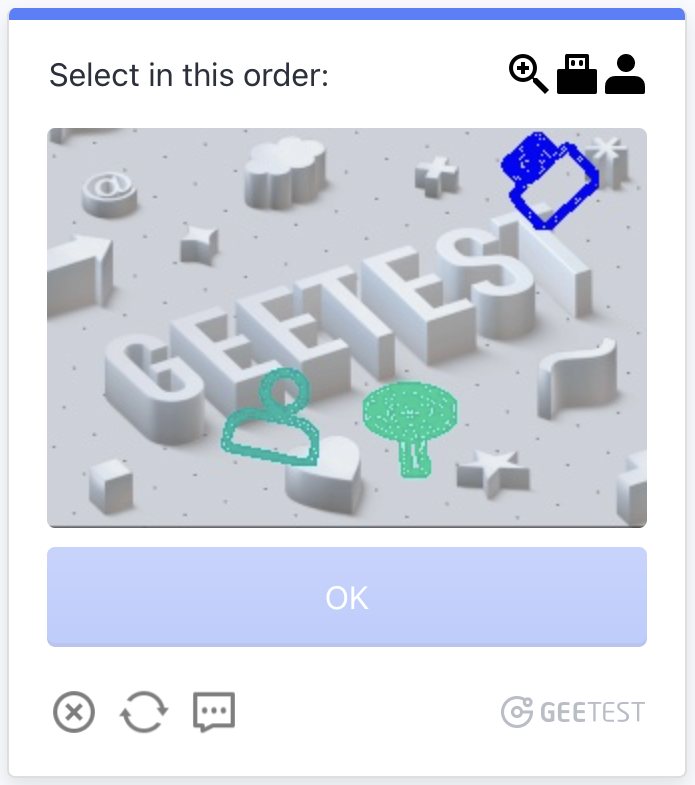
| Call | What to send | What you get |
|---|---|---|
| POST /v1/solve/geetest_icon | The large picture and the three hint icons in the order of the task. | Click points: extra.points. |
GeeTest · Slide
The caption “Slide to complete the puzzle”, a picture with a gap and a puzzle piece, and a slider with an arrow under it.
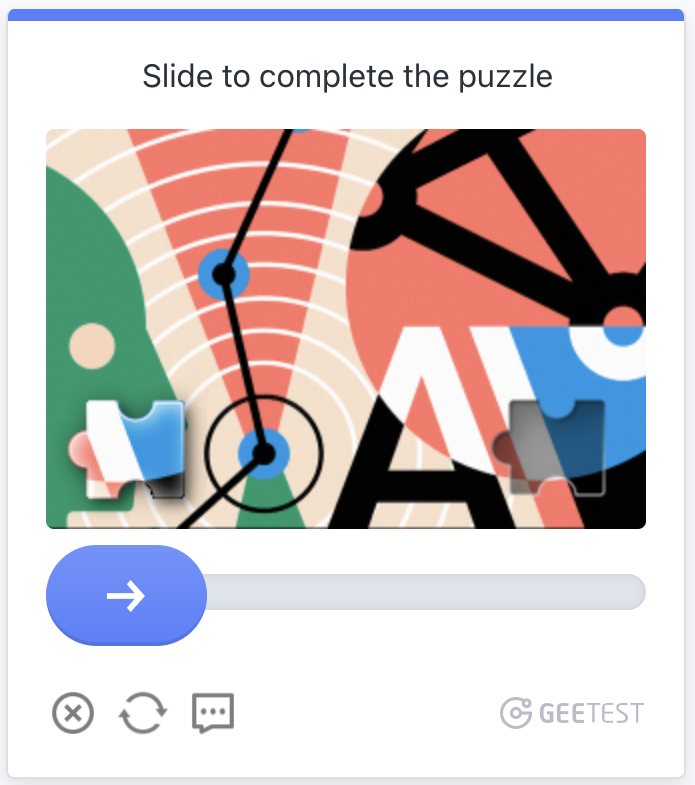
| Call | What to send | What you get |
|---|---|---|
| POST /v1/solve/geetest_slide | The background, the puzzle piece (a PNG with transparency) and its vertical position ypos. | The horizontal position of the gap: extra.x. |
GeeTest · Nine
A 3×3 grid of pictures and a separate hint picture: an object or an emotion (crying, angry, smiling face). You mark the matching cells.
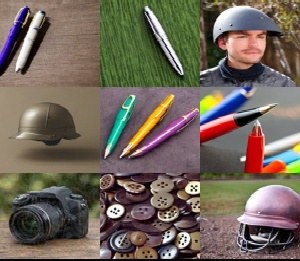

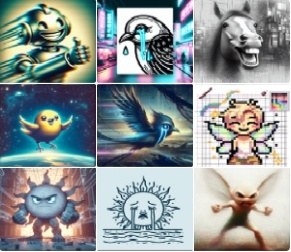

| Call | What to send | What you get |
|---|---|---|
| POST /v1/solve/geetest_nine | The whole grid as one picture and the hint. The server detects the kind of task itself. | Cell numbers from 0 to 8: extra.cells. |
Tencent · Icons
A “Verification” window with the caption “Click in this order”: coloured icons on the picture, three icons in the required order next to the caption and an OK button below.
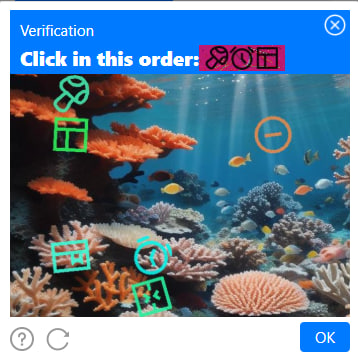
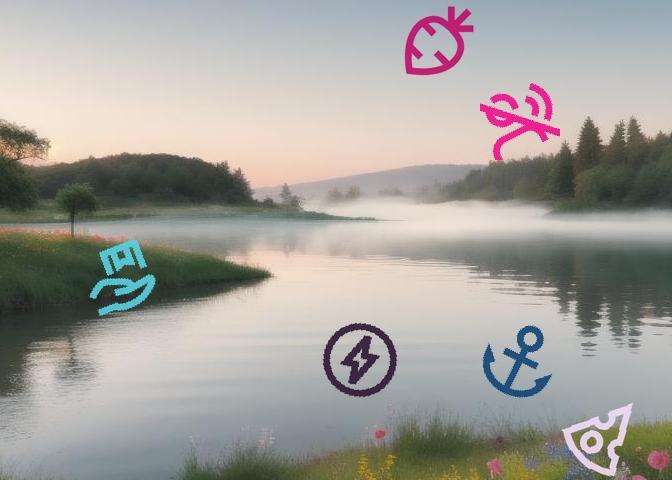
| Call | What to send | What you get |
|---|---|---|
| POST /v1/solve/tencent_icons | The 672×480 picture and the 170×50 strip, unchanged. | Click points with icon names: extra.points. |
Yandex · Icons
Yandex SmartCaptcha: icons on a busy background and a separate strip with the same icons in the required order.


| Call | What to send | What you get |
|---|---|---|
| POST /v1/solve/yandex_icons | The 500×330 picture and the 300×60 strip with transparency. | Click points with icon names: extra.points. |
Text · gaijin
A picture of letters or digits and a field to type them into. Site: login.gaijin.net.
| Call | What to send | What you get |
|---|---|---|
| POST /v1/solve/text · model=gaijin | The original captcha picture, whole. | The string for the captcha field: text. |
Text · mojeid
A picture of letters or digits and a field to type them into. Site: MojeID.
| Call | What to send | What you get |
|---|---|---|
| POST /v1/solve/text · model=mojeid | The original captcha picture, whole. | The string for the captcha field: text. |
Text · nova
A picture of letters or digits and a field to type them into. Site: Nova88.
| Call | What to send | What you get |
|---|---|---|
| POST /v1/solve/text · model=nova | The original captcha picture, whole. | The string for the captcha field: text. |